A few minutes of admin does not feel expensive.
Copying details from an email into a spreadsheet takes two minutes. Chasing an approval takes five. Updating a customer record takes another three.
The problem is not the individual task.
It is what happens when the same small task is repeated every day, by several people, for an entire year.
The goal is not to automate everything.
It is to find the repetitive work that is quietly using capacity your business could spend somewhere better.
What counts as manual admin?
Manual admin is routine work that depends on a person completing repetitive steps rather than the process moving forward automatically.
Common examples include:
- copying information between systems
- updating spreadsheets
- sending routine follow-ups
- chasing missing information
- preparing recurring reports
- creating the same document from existing data
- checking whether someone has completed the next step
- re-entering customer or supplier details
- sorting incoming enquiries
- moving information from emails into another tool
- reminding people about deadlines
- finding information that already exists somewhere in the business
None of these tasks is necessarily a problem on its own.
The question is whether the amount of time spent on them is justified.
The simplest way to calculate the cost of manual admin
You do not need a complicated ROI model.
Start with one recurring task and use this formula:
For an annual estimate, you can use:
Minutes per task ÷ 60 × times per week × working weeks per year × hourly cost
If multiple people perform the task, multiply the result by the number of people involved.
A simple example
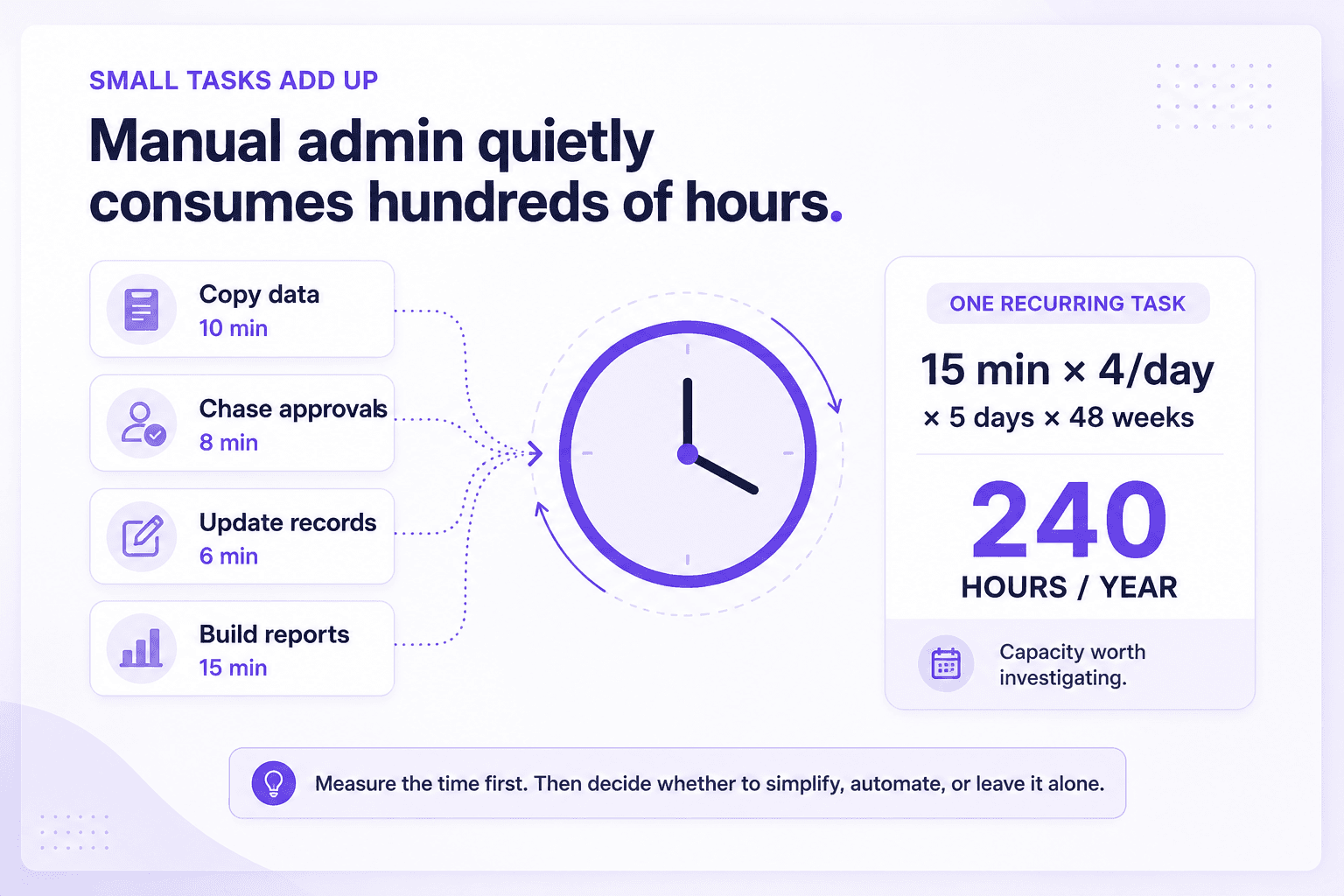
Imagine someone spends 15 minutes on a task four times a day.
Across five working days and 48 working weeks, that becomes:
240 hours per year.
If that person's approximate hourly employment cost is $30, the task represents about:
$7,200 of working time per year.
That does not automatically mean you can save $7,200 by automating it.
It means the process is consuming 240 hours of capacity.
That is the number worth investigating.
Why time is often the more useful number
Small businesses sometimes focus too quickly on the dollar value.
But the time cost can matter even more.
Two hundred and forty hours could represent:
- faster responses to customers
- more sales follow-up
- more time delivering client work
- better quality control
- less overtime
- fewer interruptions
- more capacity without immediately hiring another person
The useful question becomes:
If we gave those hours back to the business, where would they create more value?
That is a better way to think about efficiency than simply trying to cut costs.
Where manual admin hides
The obvious admin is easy to spot.
The less obvious admin often hides between systems, teams, and stages of a process.
Here are some common places to look.
1. Copying information between tools
A customer fills in a form.
Someone copies the details into a spreadsheet.
Later, another person puts the same information into a CRM.
Finance then uses part of it to create an invoice.
The issue is not that any one step takes long.
The issue is that the same information keeps moving manually.
If information already exists digitally, repeated re-entry is worth questioning.
2. Chasing people
A surprising amount of admin is really follow-up.
For example:
- "Have you approved this?"
- "Can you send the missing document?"
- "Did you update the spreadsheet?"
- "Has the client responded?"
- "Can you confirm the booking?"
- "Is this invoice ready?"
Sometimes a human reminder is necessary.
But if chasing is a standard part of the workflow, the process may be relying too heavily on memory.
3. Rebuilding the same report
Weekly and monthly reporting can become a quiet time sink.
Someone exports data.
Someone cleans it.
Someone pastes it into another document.
Someone writes a summary.
Then the same thing happens again next week.
The report itself may be valuable.
The repeated preparation may not be.
4. Searching for information
"Where is the latest version?"
"Who has that document?"
"Which email had the final approval?"
"What did we agree with this client?"
Searching does not look like admin because it is usually scattered across the day.
But if people regularly struggle to find information, the business is paying for that friction every time it happens.
5. Repeating customer communication
Businesses often answer the same basic questions again and again:
- what happens next
- what documents are required
- how long something takes
- what a service includes
- how to prepare
- when payment is due
Some of these conversations should stay personal.
Others may be ideal for better templates, triggered communication, a knowledge base, or AI-assisted first drafts.
6. Manual handoffs
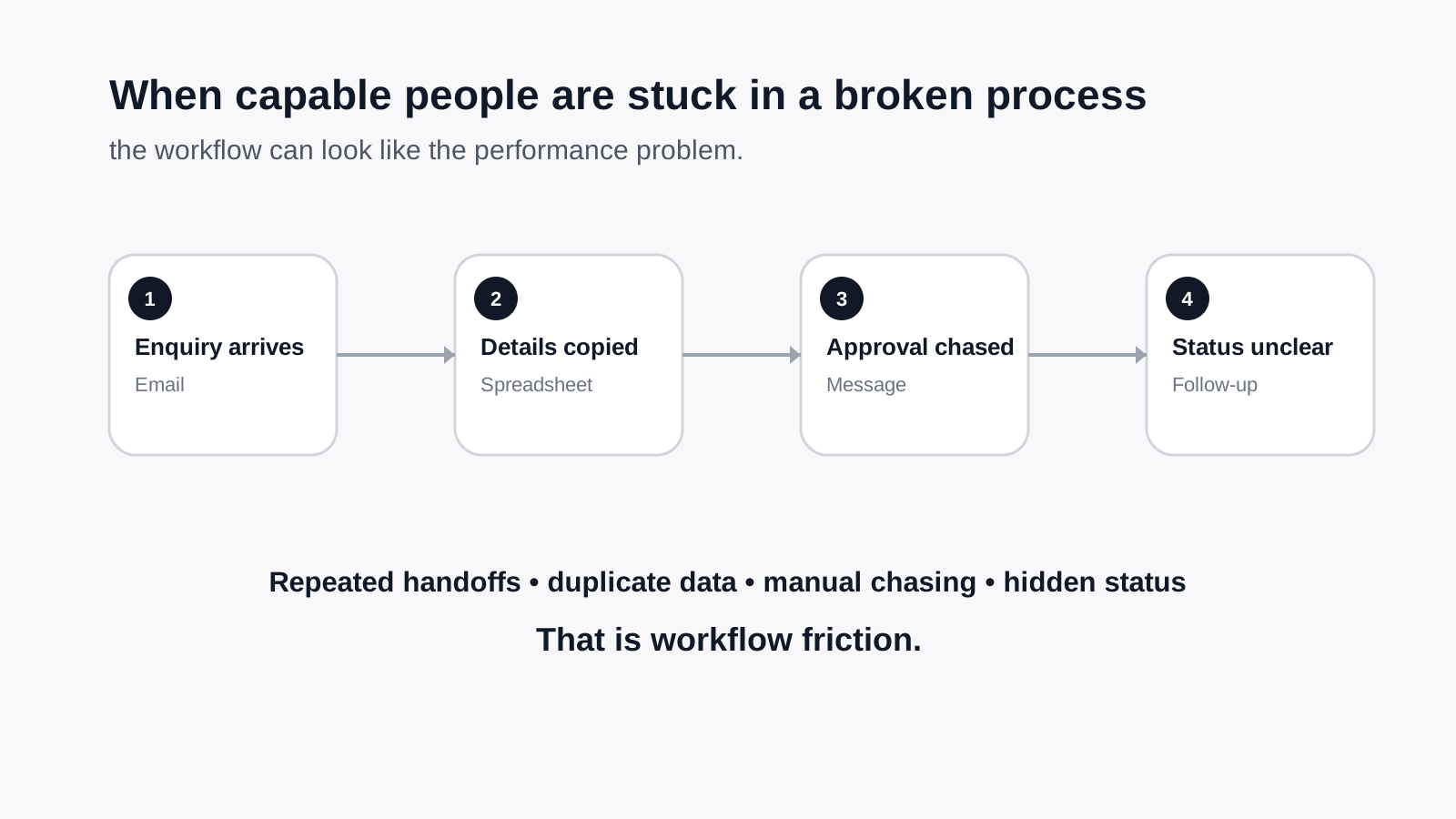
A task moves from sales to operations.
Operations sends something to finance.
Finance sends it back because information is missing.
Someone updates the customer.
Someone else updates the tracker.
Every handoff creates another point where work can wait, get lost, or require a reminder.
If this sounds familiar, read 7 Signs Your Business Has a Workflow Problem, Not a People Problem.
A quick manual-admin audit
Choose one process that happens frequently.
Then list every manual action involved.
For each action, record:
| Question | What to capture |
|---|---|
| What is the task? | The actual manual action |
| How long does it take? | A realistic average |
| How often does it happen? | Daily, weekly, monthly |
| Who does it? | Person or role |
| Why is it manual? | The reason a person is involved |
| Does it require judgement? | Yes, partly, or no |
| What happens if it is missed? | Delay, error, customer impact, none |
| Could the step be removed? | Yes, no, unsure |
This last question matters.
Do not assume every manual task should be automated.
Sometimes the best improvement is simply to stop doing unnecessary work.
The four possible outcomes
Once you understand a repetitive admin task, there are usually four sensible options.
1. Leave it alone
The task is low-frequency, low-effort, or genuinely benefits from human attention.
No change needed.
2. Simplify it
The process has unnecessary steps.
Remove them before adding technology.
3. Use traditional automation
The rules are predictable and no interpretation is needed.
Examples:
- send a reminder after a fixed period
- move data between two systems
- create a task when a form is submitted
- notify someone when a status changes
4. Use AI-assisted automation
The process involves language, interpretation, summarisation, classification, or drafting.
Examples:
- classify incoming enquiries
- extract details from emails or documents
- summarise meeting notes
- prepare a first-response draft
- identify missing information
- turn unstructured text into structured data
For a broader breakdown, see What Can AI Actually Automate in a Small Business?.
What not to automate just because it takes time
Time-consuming does not automatically mean automatable.
Keep a person closely involved when the work depends on:
- sensitive judgement
- customer relationships
- commercial negotiation
- exceptions that change constantly
- legal or financial accountability
- emotionally difficult situations
- final approval
- decisions where the consequences of an error are significant
The goal is not to remove people from the business.
It is to remove repetitive work from people where that work does not need their judgement.
Look for clusters, not isolated tasks
One five-minute task may not justify any investment.
But several related tasks inside the same workflow might.
For example, a new enquiry could involve:
- reading the message
- identifying what the prospect needs
- copying their details
- creating a record
- sending a response
- setting a reminder
- following up
- updating the status
Individually, none of those steps seems dramatic.
Together, they may form a meaningful improvement opportunity.
This is why reviewing a workflow is usually more useful than hunting for random tasks to automate.
A practical threshold: when is manual admin worth fixing?
There is no universal number.
A task is worth investigating when several of these are true:
- it happens frequently
- multiple people do it
- it interrupts higher-value work
- it creates delays
- mistakes are common
- customers notice when it goes wrong
- information already exists somewhere else
- the steps are largely predictable
- people complain about doing it
- the business expects the volume to grow
The more of these conditions apply, the stronger the case for improvement.
Manual admin versus hiring more people
When a team feels overloaded, the natural response is often to think about hiring.
Sometimes that is exactly right.
But before adding capacity, it is worth checking how existing capacity is being used.
If a new employee will spend a meaningful part of their week:
- copying data
- chasing routine actions
- compiling recurring reports
- updating multiple systems
- searching for information
- repeating predictable communication
then the business may be about to hire someone partly to absorb process friction.
Improving the workflow first can give you a clearer picture of the capacity you genuinely need.
Frequently asked questions
How do I calculate the cost of admin time?
Estimate how long a recurring task takes, multiply that by how often it happens and how many people do it, then multiply the total hours by an approximate hourly employment cost or value of the person's time.
Use the result as a decision-making estimate, not an accounting calculation.
What manual tasks are easiest to automate?
Tasks are usually easier to automate when they happen frequently, follow predictable steps, use digital information, and do not require much human judgement.
Examples include routine reminders, data transfer, document creation, status updates, enquiry routing, and recurring reporting.
Should every repetitive task be automated?
No.
Low-volume tasks may not justify the effort. Some repetitive tasks also benefit from human attention.
First ask whether the task can be removed or simplified. Automate only when doing so creates a meaningful benefit.
How can AI reduce admin work?
AI is particularly useful when repetitive admin involves reading or creating language.
It can help classify messages, extract information, summarise documents, draft responses, organise notes, or identify what should happen next.
A human should remain involved where accuracy, context, judgement, or accountability matters.
Is automation mainly about reducing staff costs?
It does not have to be.
For many small businesses, the bigger benefit is capacity.
Reducing repetitive admin can give existing employees more time for customers, sales, delivery, problem-solving, and work that requires their expertise.
Start with one hour
You do not need to map the entire business.
Find one recurring process and ask:
Where does one hour of avoidable admin disappear every week?
Then work out what that becomes over a year.
If the answer is meaningful, look at the process before looking for a tool.
Sometimes the solution will be AI.
Sometimes it will be ordinary automation.
Sometimes it will be a simpler workflow.
And sometimes the right answer is to leave the task exactly as it is.
That is the point.
The goal is not more automation.
It is a business that uses its time deliberately.
If you want an outside view of where manual work, disconnected systems, and repetitive processes are consuming capacity, the allmi AI Efficiency Assessment identifies the highest-value opportunities and helps separate what is worth fixing from what is better left alone.